My own product · Live SaaS

Silktrace

Silktrace is a live SEO research platform. Sign in, connect your own DataForSEO account and investigate any domain’s traffic, keywords, technical health, links and AI search presence in one private workspace. I designed it, built it and run it, from the interface to the threat model.

OwnershipMy own product
StatusLive · version 0.1.49
My roleFounder: product, design, engineering

The short version

What it is

A multi-tenant web app for SEO research: domain overview, organic keywords, page reports, technical audits, backlinks, dead-link opportunities, competitors, SERPs and AI search evidence, all in one workspace.

What I built

The product design, a Next.js app with 41 API routes and 24 pages, a PostgreSQL data model, sign-in, encrypted per-workspace provider credentials, durable task and quota accounting, and a procedural WebGL public site.

Why it stands out

It is built for hostile traffic and real money: a written threat model, an authorization class for every route, restore drills and deletion ledgers. Solo-built software with the operating discipline of a team product.

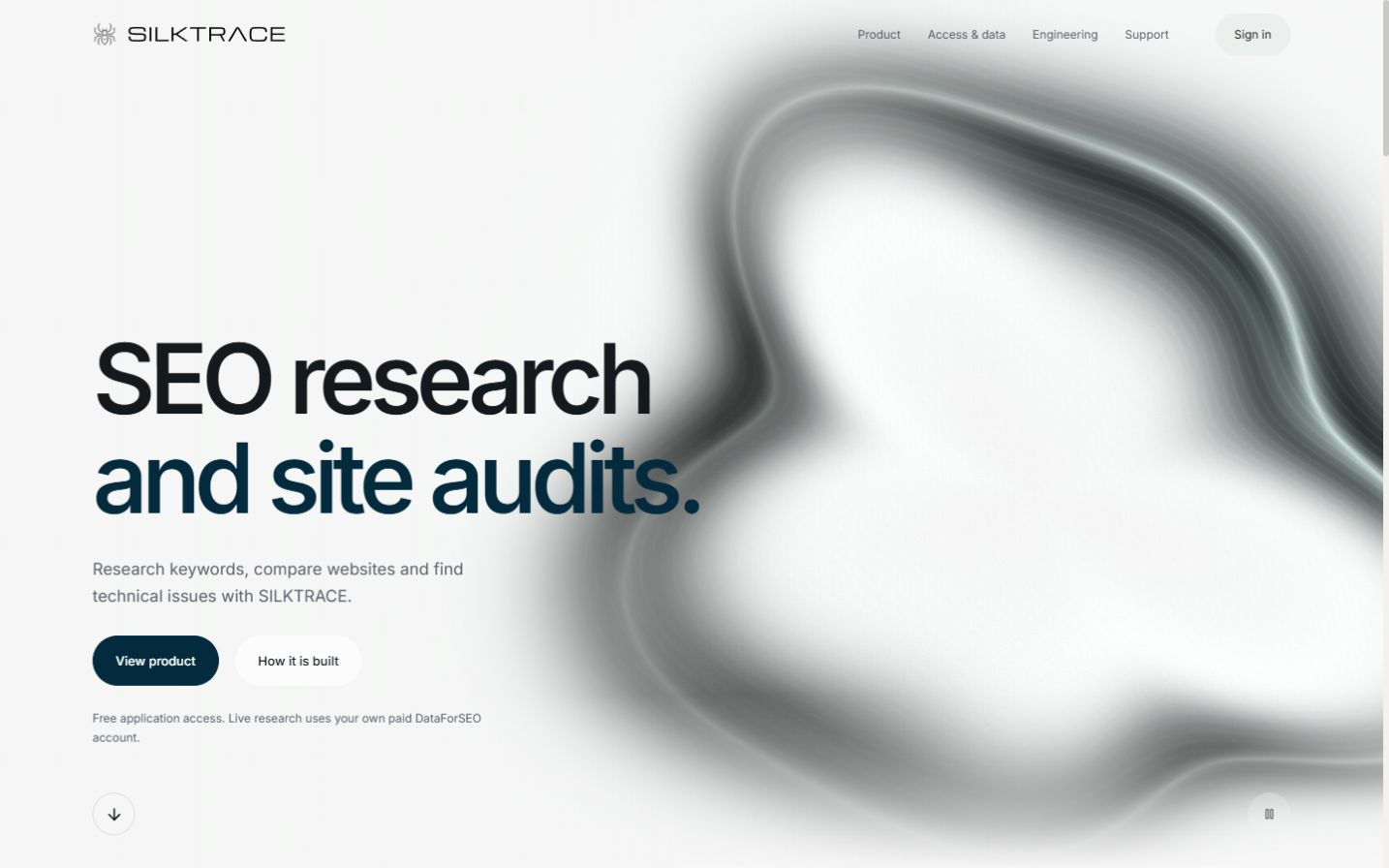
Silktrace public homepage with a procedural silver silk surface behind the product headline.

The public site, captured 4 October 2026. The silk surface is procedural WebGL; it responds to motion preferences and pauses when hidden.

By the numbers
41API routesEach assigned an authorization class
1,012Test assertions51 unit test files, plus tenancy integration and security suites
13Database migrationsPostgreSQL with Drizzle
61Engineering documentsThreat model, runbooks, release and security contracts

Counted from the repository on 4 October 2026.

01 · Scope

A research tool,
run as a service.

A demo can stop at the interface. Silktrace has accounts, private data, paid third-party calls and an operations layer, because real people sign up and spend real money through it.

01 · Research

Investigate

  • Domain overview and history
  • Organic keywords, pages and competitors
  • Technical audits with affected URLs
  • Backlinks and dead-link opportunities
  • SERP and AI search evidence
02 · Accounts

Private by default

  • Sign-in with one private workspace per account
  • Bring-your-own DataForSEO key
  • Credentials encrypted per workspace
  • Quotas and account deletion
03 · Reliability

Correct under failure

  • Durable task records
  • Idempotent request keys
  • Saved snapshots kept apart from new runs
  • Unknown spend reconciled, never retried
04 · Operations

Run like a service

  • Database restore runbook and drill
  • Credential key rotation
  • Account suspension and deletion ledger
  • Sanitised preview environment and release scan
02 · Security

Hostile traffic
assumed.

The threat model starts from one line: low expected traffic does not mean trusted users. Every boundary that matters has a control in the code and a test or drill behind it.

Risk, control and how it is checked
RiskControl in the codeChecked by
One customer reads another customer’s researchThe server resolves the workspace from the session; PostgreSQL relationships enforce ownership; the app connects as a restricted database role.Two-workspace integration test against the real database
A leaked or reused provider keyOne encrypted credential per workspace with a versioned envelope; caches keyed by workspace and credential version; a key re-wrap script for rotation.Unit tests and an operations script
Surprise spend on paid researchSigned approval bound to the exact request at $0.05 or more, atomic quotas and idempotent task keys.Spending, quota and duplicate-request tests
Sign-in abuse and open redirectsStrict OAuth callback and redirect allowlist; public routes have no private or provider access.Playwright OAuth negative-case matrix
A route quietly skips authorizationEvery route is classified, from public-static to authenticated-write, with origin checks and idempotency where writes can retry.Route authorization matrix and edge isolation suite
Data loss or a bad deployDocumented restore runbook, restore verification and drill scripts, a deletion ledger and a release security scan.Runbook drills

From the source, tests and operations documents.

03 · In use

Start with a domain.
Leave with a better question.

A report earns its place by pointing at the next thing to inspect. Three views from the same regional topic show how the hierarchy keeps evidence one step away from every claim.

Step 1 · Read the overview

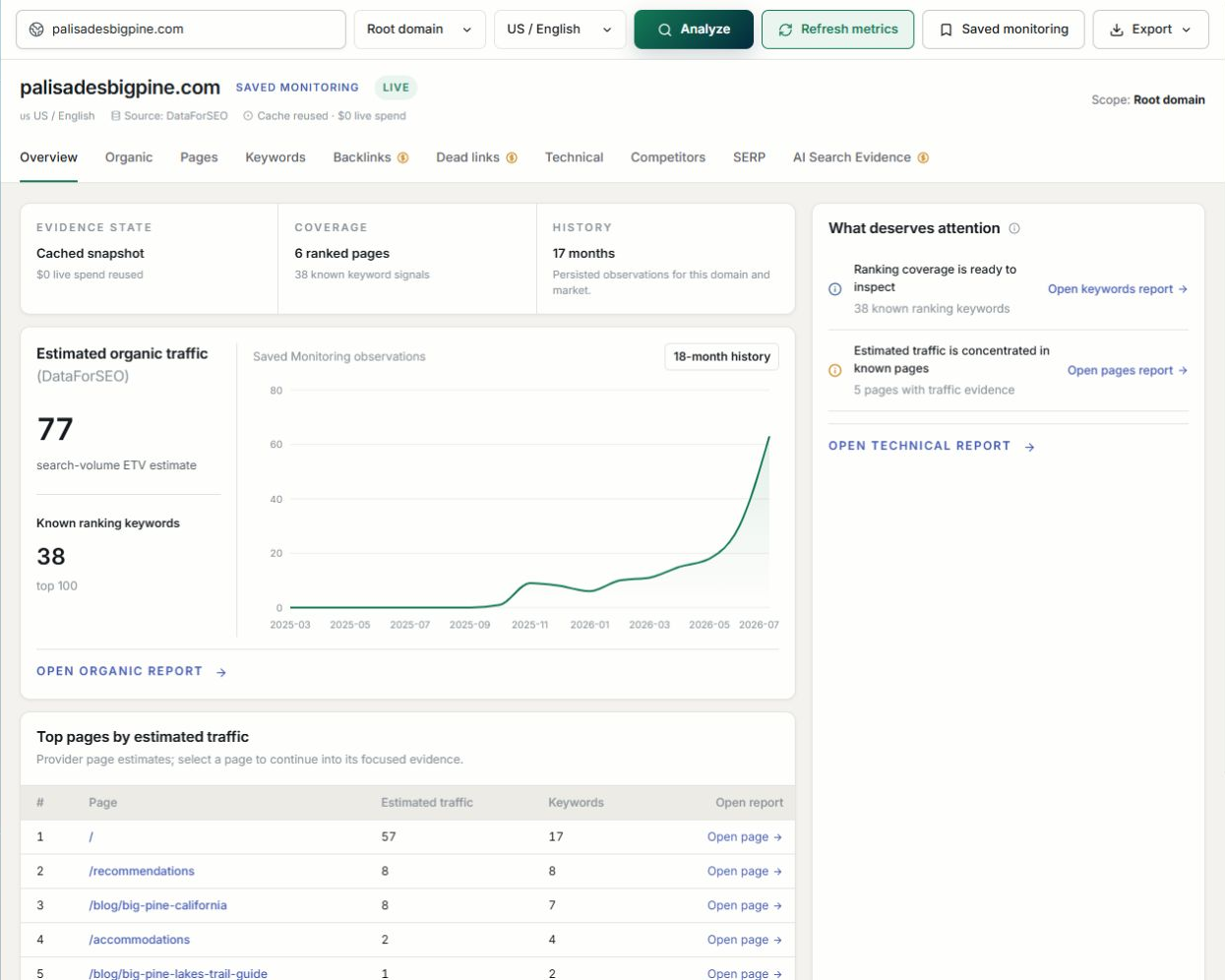
Saved Silktrace domain report for palisadesbigpine.com showing evidence state, coverage, an estimated traffic chart, 38 known ranking keywords and a top pages table.
  1. Evidence state comes first. A cached snapshot with $0 live spend. You know what you are reading before you read the chart.
  2. Estimated, and labelled so. Traffic is clearly labelled as a DataForSEO estimate.
  3. The next question is pre-written. “What deserves attention” links straight into the keyword and pages reports.
  4. Every row continues. Each top page opens into its own focused evidence.

Saved Palisades report, Silktrace 0.1.48.

Step 2 · Check what the data is

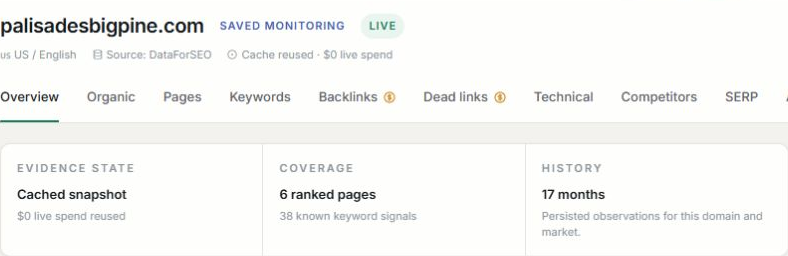
Detail of the evidence header: Source DataForSEO, cache reused, $0 live spend; evidence state cached snapshot; coverage 6 ranked pages and 38 keyword signals; history 17 months.
  1. Cost is visible before anything runs. This read reused a cached result. No new spend.
  2. A snapshot is called a snapshot. Saved evidence never pretends to be live.
  3. Coverage is stated. 6 ranked pages and 38 keyword signals: the limits of the sample are on screen.

Detail from the same saved Palisades capture.

Step 3 · Ask the next question

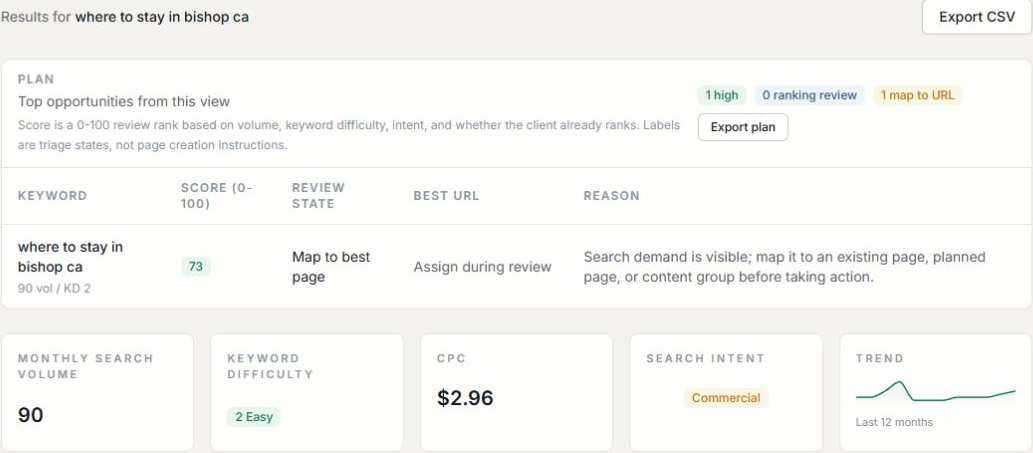
Keyword review for where to stay in bishop ca: score 73, review state Map to best page, 90 monthly searches, keyword difficulty 2, CPC 2.96 dollars, commercial intent.
  1. A review rank, not a verdict. The score blends volume, difficulty, intent and whether the site already ranks.
  2. “Map to best page.” A person decides where it belongs. Demand alone does not justify another page.
  3. Intent in plain sight. Commercial intent, CPC and difficulty sit beside the decision.

A saved keyword investigation in the same topic.

The iteration that shaped it. An early overview led with written assessment, and people had to read before they could scan. I moved the chart and page table back to the main view and put interpretation in Insights. Evidence within reach first; help reading it second.

04 · Decisions

Browsing a report
should not buy another.

Every new provider request costs real money. The architecture treats spending as something a person approves, the server accounts for and an interruption can never silently repeat.

Reading is free.

Chose
Opening a saved report reads stored evidence. New research is a separate, explicit action.
Instead of
Refreshing data whenever a report opens.
Trade-off
Saved views can be older, so each one carries its capture time and freshness state.

Approve the exact request.

Chose
Requests estimated at $0.05 or more need a short-lived signed approval bound to the workspace, inputs, estimate and request key.
Instead of
A blanket “allow spending” setting.
Trade-off
One more confirmation, but approval can never carry over to a different purchase.

Never blind-retry money.

Chose
Quota is reserved and a durable task recorded before execution. Matching requests reuse that task.
Instead of
Automatically retrying failed provider calls.
Trade-off
Interrupted work is recorded as unknown spend and waits for a decision instead of paying twice.

Ownership lives on the server.

Chose
The session resolves the workspace; queries check ownership; caches are keyed by workspace and credential version.
Instead of
Trusting a project ID sent by the browser.
Trade-off
More plumbing in every query, and no path from one workspace’s research to another’s.
05 · Architecture

One workspace.
Two different actions.

The latest run and the last saved audit are stored separately. If a refresh fails, the interface can say so while the earlier findings stay visible, instead of a failed request looking like vanished data.

Coverage also names what the provider did not establish, including Google-selected canonicals and real-user Core Web Vitals. Missing evidence is never quietly turned into zero.

Request new research

  1. Bind the approvalTo the exact request, at estimates of $0.05 or more
  2. Reserve a taskQuota before execution; matching requests reuse it
  3. Execute and saveProvider evidence plus a receipt

Other paths

  • Just reading a saved report?Authorize the workspace and read stored evidence. No provider call, no charge.
  • Interrupted after a possible submission?Record unknown spend, release the concurrency slot, keep the task. No automatic resubmission.

Simplified from the implementation.
06 · Where it stands

A research product with
decisions behind it.

Shipped
  • Domain overview, organic, pages and keyword reports
  • Technical audits with affected URLs and freshness
  • Backlink and dead-link evidence for human review
  • Google sign-in and private workspaces
  • Request-bound spending approval and quotas
  • Procedural WebGL public identity
Tested in the repository

Tests cover cross-workspace access, altered spending approvals, duplicate requests, quota limits and abandoned-task reconciliation.

Built with

Next.js and TypeScript, PostgreSQL with Drizzle migrations, DataForSEO, Playwright. Deployed on Vercel behind Cloudflare, with GitHub Actions.

Turning research into a useful product? Start a conversation

All projects ↗
Contact

Available for select projects and opportunities

Have a website that needs to win work?

alex@jardinestudio.com

Let’s work together. Have a project in mind or a role you’re hiring for? I’d like to hear about it.

Open email app
Toronto, Canada · --:--Working remotelyLinkedIn (opens in a new tab)