Internal product · Version 2.0 beta

Lead Finder

Lead Finder is a prospecting operating system for small SEO and web agencies. It finds local businesses that need help, proves why with real website and search evidence, and runs the pipeline in a workspace that remembers every business across research runs.

OwnershipInternal product, Jardine Studio
StatusWorking beta · 2.0 development
My roleProduct design and engineering
Built withPython, FastAPI, React, TypeScript

The short version

What it is

An agency picks a niche and a territory. Lead Finder discovers businesses with no real website or weak search visibility, audits their sites, qualifies them with AI against the evidence and hands the good ones to a pipeline.

What I built

A FastAPI and React product with 171 API endpoints, 19 database migrations, two discovery engines, a bounded first-party crawler, AI qualification with Anthropic’s Claude, workspace tenancy, a usage ledger and Stripe billing scaffolding.

Why it stands out

It solves the hard part of prospecting: staying true over time. Stable business identity, change detection that ignores noise, and evidence behind every recommendation.

By the numbers
171API endpointsAsync FastAPI service
2,190+Automated tests223 test files across backend and frontend
19Database migrationsSQLAlchemy models with Alembic
172KLines of codePython and TypeScript, including tests

Counted from tracked repository files on 4 October 2026. Test count is test functions in source.

01 · Scope

Find. Work.
Replenish.

The product contract is three jobs. It deliberately stops short of email sending, dialers and client reporting, so it can do research and decisions properly.

01 · Find

Discovery

  • No-website and social-only finder
  • Search visibility engine on DataForSEO
  • Saved Markets by niche and territory
  • AI-suggested niches kept local to a campaign
02 · Prove

Evidence

  • Bounded first-party site crawl
  • Critical, warning and improvement findings by page
  • PageSpeed as supporting context
  • AI qualification grounded in the evidence
03 · Work

Pipeline

  • Save, flag or skip at the point of review
  • Activities, next actions and outcomes
  • Today queue of what needs attention
  • Exports and handoff
04 · Replenish

Memory

  • Stable identity across runs
  • New versus changed businesses
  • Health and shortfall signals per market
  • Usage ledger and caps
02 · In use

Decide next to
the evidence.

The market list stays in view while a business opens over it. Inspect the website or search evidence, open any finding down to the page it came from, then save, flag or skip without losing your place.

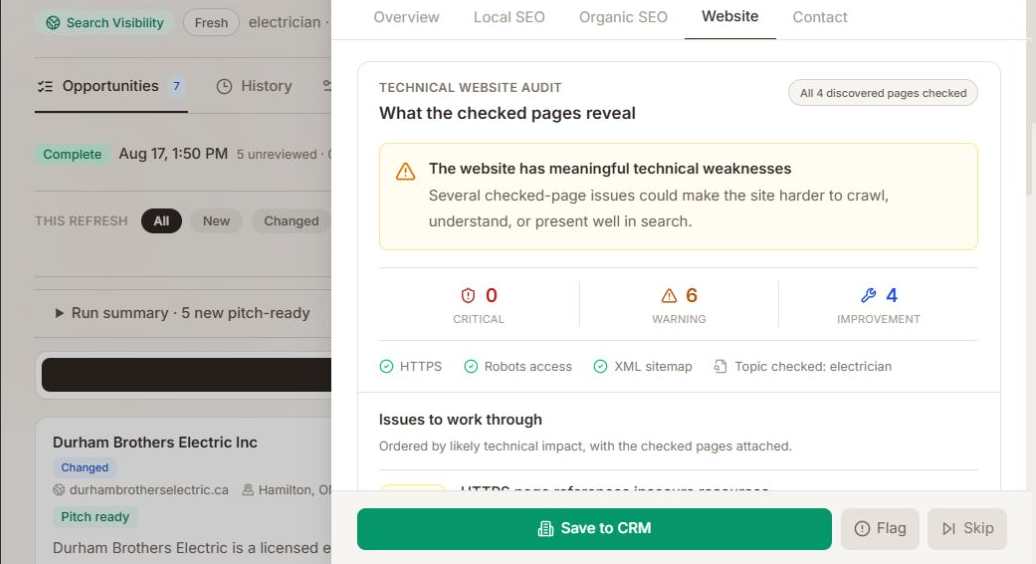
Step 1 · Review in context

Lead Finder market view with a business detail panel open on the Website tab: a technical audit of all 4 discovered pages with 0 critical, 6 warning and 4 improvement findings, and Save to CRM, Flag and Skip buttons.
  1. The market stays put. The opportunity list remains visible behind the panel.
  2. “Changed”, not “new”. A returning business says what happened since last time.
  3. Counts before claims. Findings by severity across all 4 discovered pages.
  4. Decide in place. Save to CRM, Flag or Skip at the point of review.

Saved beta capture, dev.190.

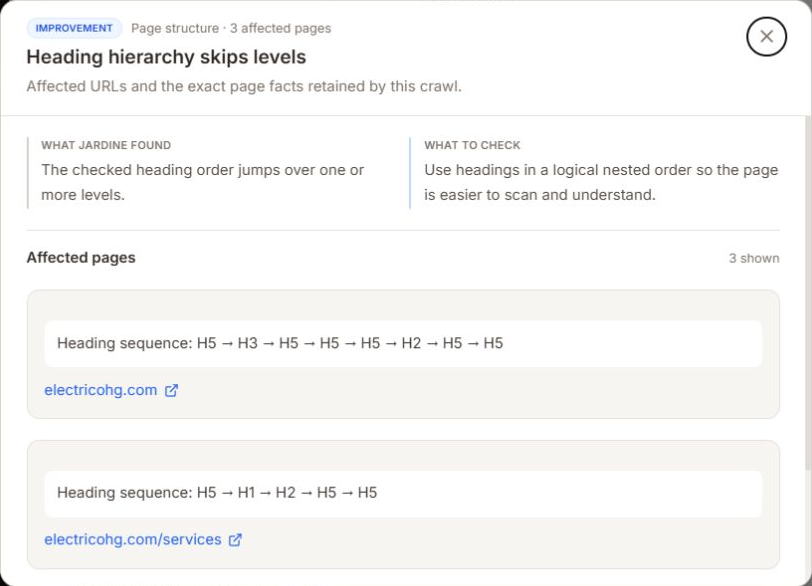
Step 2 · Open the finding

Finding detail: heading hierarchy skips levels, page structure, 3 affected pages, with exact heading sequences such as H5, H3, H5 retained for each affected URL.
  1. A finding names its scope. Page structure, three affected pages.
  2. Observation and advice are separate. What was found, then what to check.
  3. The exact facts. The heading sequence retained from each crawled page.

Saved beta capture, dev.192.

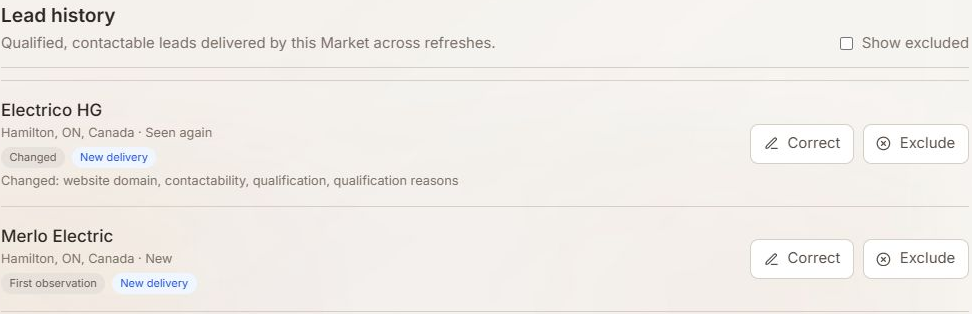
Step 3 · Return to the market

Lead history: Electrico HG seen again and marked Changed, listing changed website domain, contactability and qualification; Merlo Electric marked as a first observation.
  1. Seen again, and changed. The changed fields are named, not just flagged.
  2. First observation. New businesses never blur into returning ones.

Saved beta capture, dev.190.

03 · Refresh logic

A refresh should
tell you something.

Refreshing a market should answer one practical question: what deserves another look? The comparison is deliberately selective.

Flags a change
  • A new website domain
  • A changed contact route
  • Qualification moved
  • Qualification reasons changed

Named in the history so the reviewer sees why it resurfaced.

Ignored as noise
  • Search position 12 to 18, inside the same band
  • The same data in a different order
  • Different model wording, same meaning

Ordinary jitter does not earn another look.

Marked unknown
  • Missing from a Search Visibility refresh

Absence is not evidence that the opportunity is gone, so incomplete research cannot rewrite what the workspace knows.

04 · Data model

One business.
Many observations.

A business, an observation and an opportunity are separate records. New research adds evidence to an existing prospect while the earlier research, review decisions and pipeline activity stay attached.

Matching is deliberately conservative. A provider identifier or corroborated details can establish a match. A shared domain alone cannot. Conflicting or weak signals create a provisional identity for a person to review instead of silently merging two businesses.

Identity rules

  1. Observation AFirst research run
  2. Observation BLater research run
  3. Identity checkProvider ID, or corroborated name, domain, phone and location
  4. One prospectRetained observations, review decisions, pipeline activity

Edge cases

  • Conflicting or weak matchStays provisional for human review.
  • Shared domain onlyNever enough to merge two businesses.

Simplified from the implemented identity rules.
Trade-offs

Careful by
default.

Bounded crawls, labelled samples.

Chose
Up to 25 pages. Small sites show every eligible page; larger sites show a labelled sample.
Instead of
Presenting a partial crawl as a full assessment.
Trade-off
Fast, predictable crawls, and reports that say exactly which pages were checked.

Positions compared in bands.

Chose
Search rank changes count only when they cross a band.
Instead of
Alerting on every movement.
Trade-off
The history highlights meaningful movement instead of daily jitter.

A pipeline, not a mailer.

Chose
Notes, activities, next actions and recorded outcomes.
Instead of
Building email delivery and sequencing in.
Trade-off
Outreach happens elsewhere, and the tool stays focused on research and decisions.
05 · Where it stands

Continuity is
the result.

A reviewer can return to a market and tell a new observation from a changed business, with the history still attached.

Shipped in the beta
  • Saved Markets with two discovery paths
  • Website and search evidence with page-level findings
  • Save, flag and skip review decisions
  • Change history across refreshes
  • Integrated pipeline for follow-up
Built with

React and TypeScript on an asynchronous FastAPI service, SQLAlchemy and Alembic, durable run records, DataForSEO, Anthropic’s Claude, Stripe billing scaffolding and Supabase auth in preview.

Bringing business research into one workflow? Start a conversation

All projects ↗
Contact

Available for select projects and opportunities

Have a website that needs to win work?

alex@jardinestudio.com

Let’s work together. Have a project in mind or a role you’re hiring for? I’d like to hear about it.

Open email app
Toronto, Canada · --:--Working remotelyLinkedIn (opens in a new tab)