AWL
AWL is the private control room for jardinestudio.com. It manages every page, service, FAQ, redirect, price tier and journal article on the site, and commits each change to Git, so a custom-coded website is as easy to run as a CMS without becoming one.
The short version
A Next.js app that runs only on my machine and edits the Jardine Studio repository directly: 11 structured content files, MDX journal articles and their images.
Schema-synced editors for pages, services, FAQs, SEO, redirects, calculator pricing, the ticker and site architecture, plus atomic writes with read-back, path-scoped commits, a media inventory and maintenance tools.
It gives a hand-built site the editing comfort of a CMS with no second content model, no hosted attack surface and no risk of overwriting work in progress.
Counted from the repository on 4 October 2026.
One editor for
the whole site.
Not just blog posts. AWL edits the content, search settings and even the pricing behind the public calculator, all against the same schemas the website validates.
Pages and copy
- Page sections and calls to action
- Service pages
- FAQs and ticker
- Work entries
- MDX journal articles
Discoverability
- SEO titles with length targets
- Redirects
- Site architecture map and gaps
- Tag metadata
Live tools
- Calculator configuration
- Pricing tiers
- Widget settings
Maintenance
- Image usage and alt text
- Reviewed year updates
- Schema sync checks
- One commit per change
Make the edit small.
Make the result inspectable.
Change one word in a page title, save, and get back a commit you can review. Then watch the editor refuse a save that would overwrite somebody’s draft.
Step 1 · Edit a field
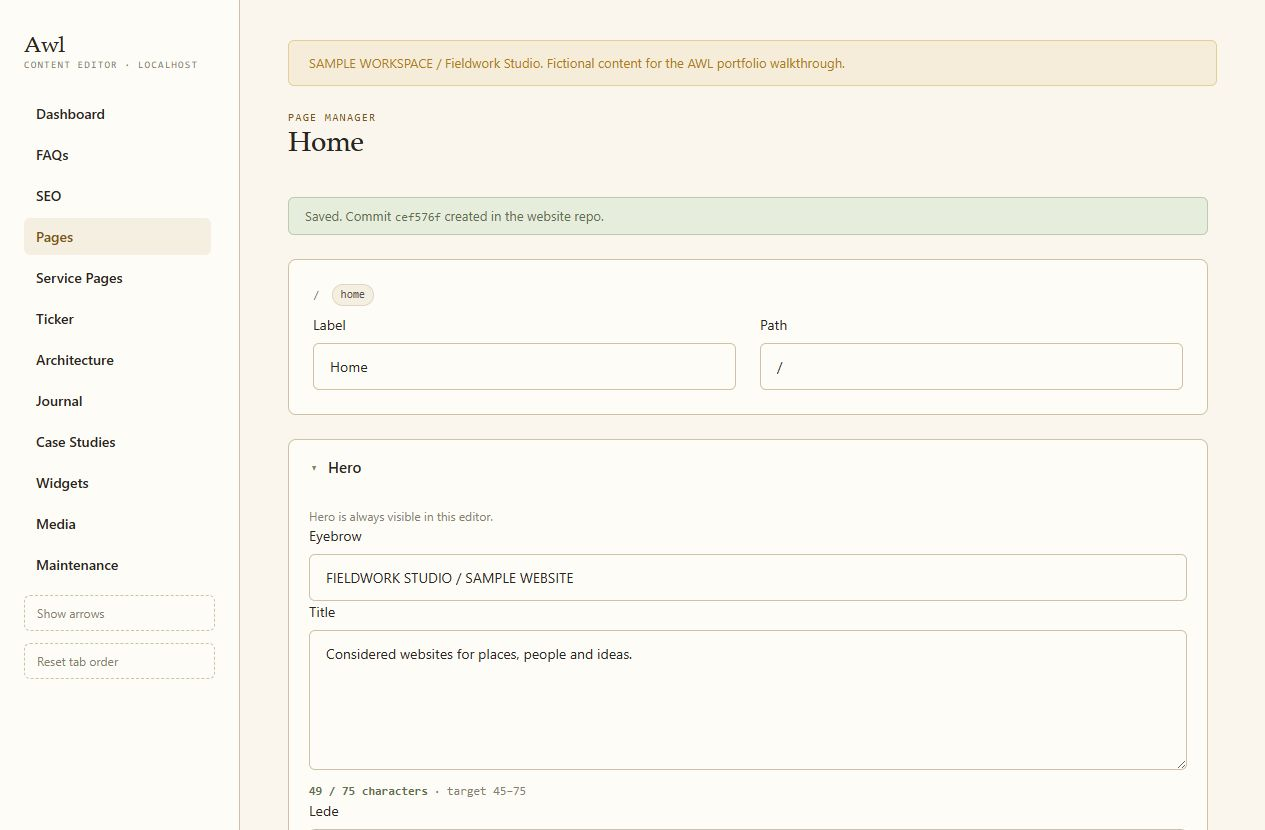
- ASaved, with a hash. Commit cef576f created in the website repo.
- BFields that match the page. The hero title, with a 45 to 75 character target.
- CShaped around this site. Pages, service pages, journal, media and maintenance.
Sample workspace, captured 9 September 2026. The edit and commit are real.
Step 2 · Review the change
  Home page · hero title
- Thoughtful websites for places, people and ideas.
+ Considered websites for places, people and ideas.Step 3 · Refuse a risky save
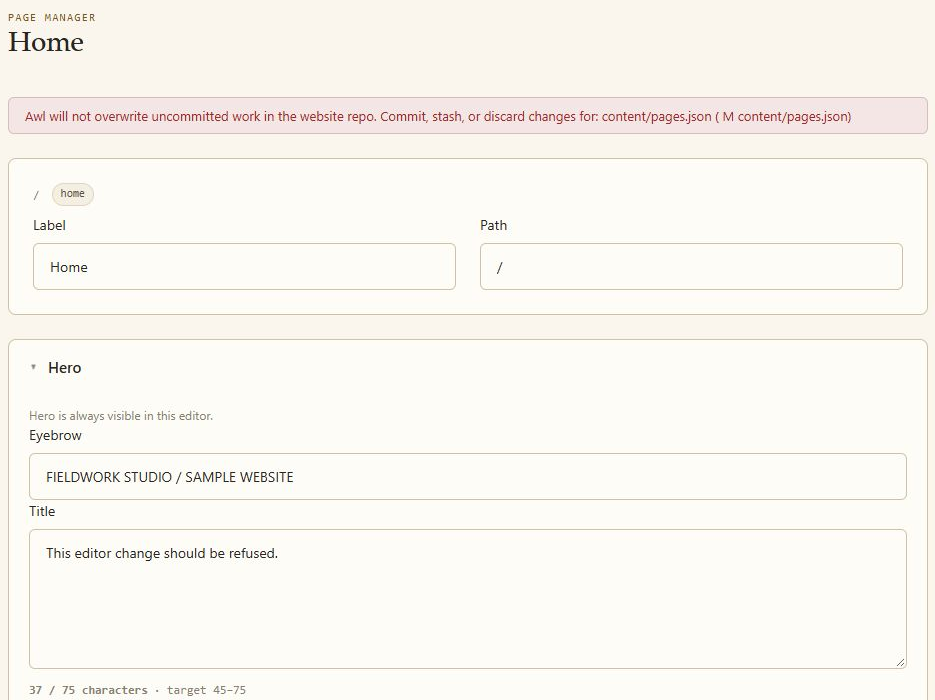
- AWork in progress is protected. content/pages.json already held an uncommitted draft, so the write was refused.
- BNothing changed on disk. The draft’s bytes and the repository commit stayed exactly as they were.
A real refused save in the sample repository.
An editor that
follows the website.
AWL uses the website’s own page-content schema, with a synchronisation check before every save. If the site’s schema changes after AWL copied it, the editor refuses to write until they agree again.
Text saves go to a temporary file beside the destination, are renamed into place and read back. Transient Windows and OneDrive locks get bounded retries; a mismatch is reported as an error. The commit includes only the intended content path, so unrelated staged and unstaged work stays out of it.
Implemented save path
- 01Edit structured contentFields follow the website’s schema
- 02Check before writingSchema sync, target file state, input validation
- 03Write and verify textTemporary file, rename, read back
- 04Commit the intended pathReturn a hash; leave other work alone
Deliberately outside
- PublishingPushing and deployment stay a separate, manual step. A save is not a publish button.
Simplified from the implementation.
Know where every
image is used.
A media folder does not tell you what a file supports. AWL scans images and the references to them in content and components, then connects each asset to its usage and alternative text.
Alt text is edited at the reference where it belongs. Before changing it, AWL re-reads the source and checks the old value still matches; if another edit intervened, it asks for a rescan. Dynamic values stay in code.
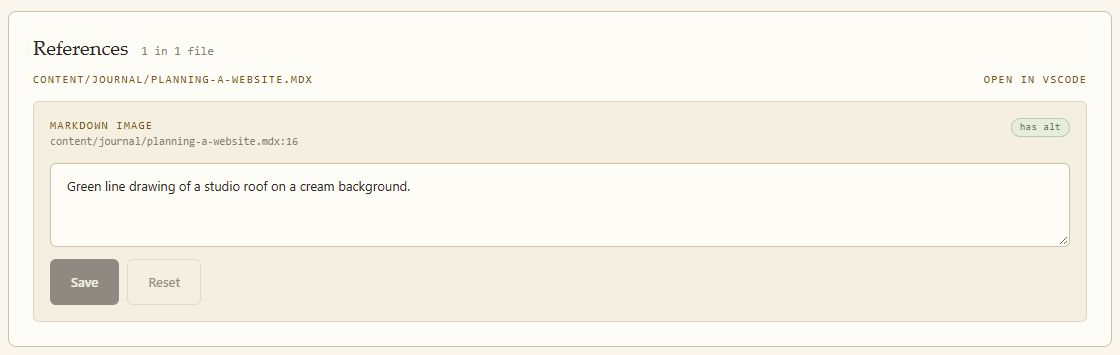
- AExactly where it is used. planning-a-website.mdx, line 16.
- BEdit at the reference. Alt text changes in the source that uses the image.
- CStatus at a glance. References with and without alt text are marked.
A real alt-text edit in the sample workspace. The saved commit changed that single journal file.
See the whole
site at once.
An architecture view maps page relationships and flags content gaps, so editing decisions can be made with the structure in view.
It is tailored to this site’s own files, schemas and content mapping, which is exactly what lets the interface reflect how the site actually works.
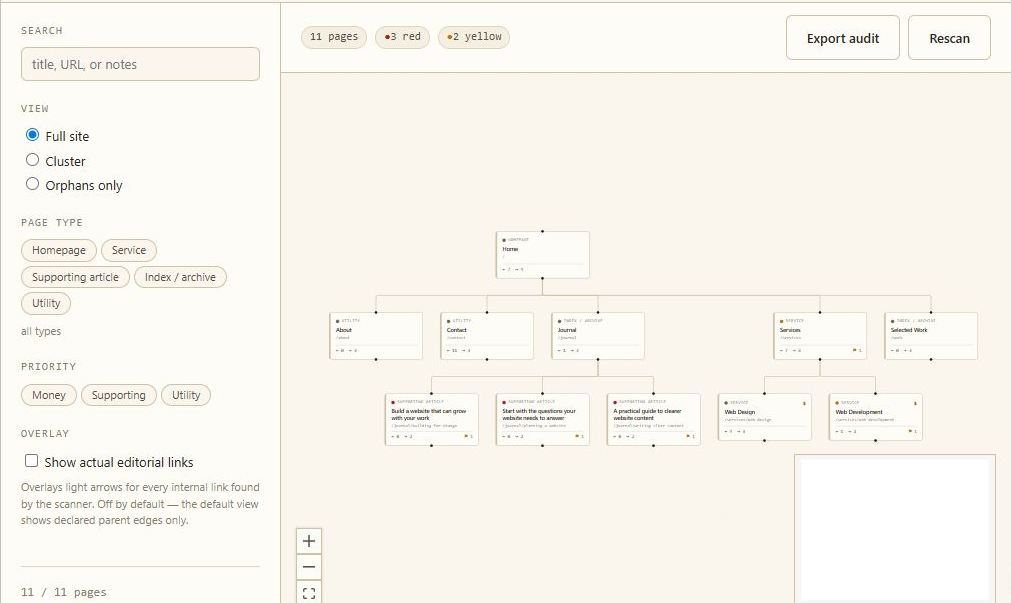
Sample capture, 9 September 2026.
Editorial control,
source ownership intact.
- Page, service, journal, SEO and widget editors
- Schema synchronisation checks
- Atomic, read-back text writes
- Path-scoped local commits
- Media usage inventory and alt-text editing
- Reviewed year maintenance for journal content
Runs privately on the owner’s machine and works directly in the website repository, so publishing stays a deliberate, reviewed step.
Real edits, real commits and a real refused save, demonstrated on a sample workspace.
Need content editing for a custom-built website? Start a conversation
All projects ↗Available for select projects and opportunities
Have a website that needs to win work?
Let’s work together. Have a project in mind or a role you’re hiring for? I’d like to hear about it.
Nothing opened? Use Copy address and paste it into your email app.